Parth Shah from XDA-Developers, a website for technology and computer enthusiasts, wanted to learn Docker. It is a program that packages an application into a “wrapper” called a container. This package has all the things you need: libraries, settings and tools. Thanks to this, the application works in the same way, e.g. on our laptop, on a colleague's computer or on a cloud server.
Learning Docker is very useful because it saves time and nerves. Instead of struggling with installations and versions, we simply launch a ready-made container. IT employers often require knowledge of Docker, and knowing the basics speeds up work and helps implement ready-made projects faster.
Shah had a similar problem to many of us. He wanted to learn how to use a given technology, but he had to go to various sources and the learning process itself was chaotic. He decided that he would give NotebookLM, a Google tool that is a kind of assistant for learning from provided sources, a chance. In principle, NotebookLM can act as our private teacher who uses the materials we provide him with.
Check also: Humanoids are supposed to replace us. AI keeps a close eye on people
NotebookLM as an assistant for learning from sources
NotebookLM works like a private teacher who knows exactly the materials we give him. We upload links, PDFs, Google documents and even YouTube videos to it. We can then talk to the application about these materials, and the responses immediately have quotations and links to a specific place in the source, so we can quickly check where they came from.
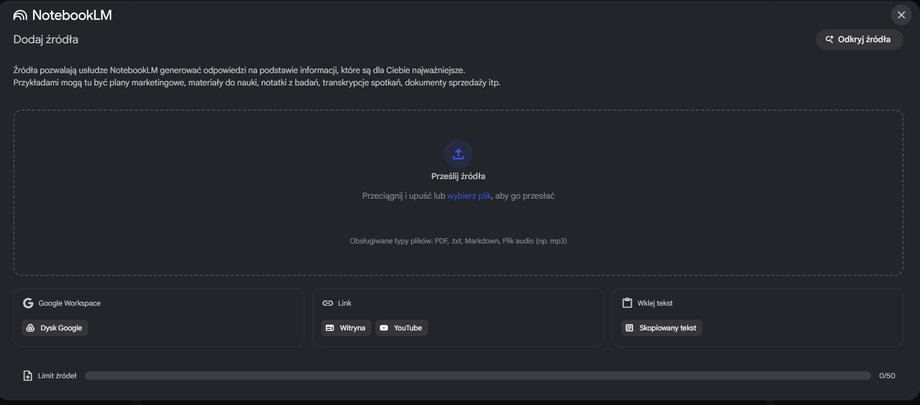
We place sources here. You can add, among others: URLs or YouTube videos.
|
Matt. own
Importantly, with one click we will also generate accessible summaries or guides, and even audio discussions – short conversations between two lecturers that summarize the most important things from the provided files. This speeds up learning because we do not wander around the Internet, but work on selected, reliable texts and recordings. You can also generate videos, although the tool usually takes about 5-10 minutes to create a video. Let's add that the content is later available in Polish.
The story from XDA is quite typical: the author wanted to learn Docker, but felt that YouTube tutorials were distracting and the documentation was overwhelming. When he moved all this to NotebookLM, a plan suddenly emerged:
- Materials collected in one place
- Clear explanations with quotes
- Quick comparisons of concepts and activities to practice
Effect? “I should have done it sooner,” Shah said. The application creates order in the content, and the conversation and audio version make it a good quality guide is created from the materials provided.
How to learn with NotebookLM using Docker? Start by choosing the topic you want to master, then collect at least 4-6 source materials, e.g. official documentation or user manual, an accessible introduction, a specific article with details, as well as an online course video from YouTube. Once you've added your sources, ask NotebookLM for a quick start guide that explains basic conceptswill show the first practical example and suggest two mini-tasks.
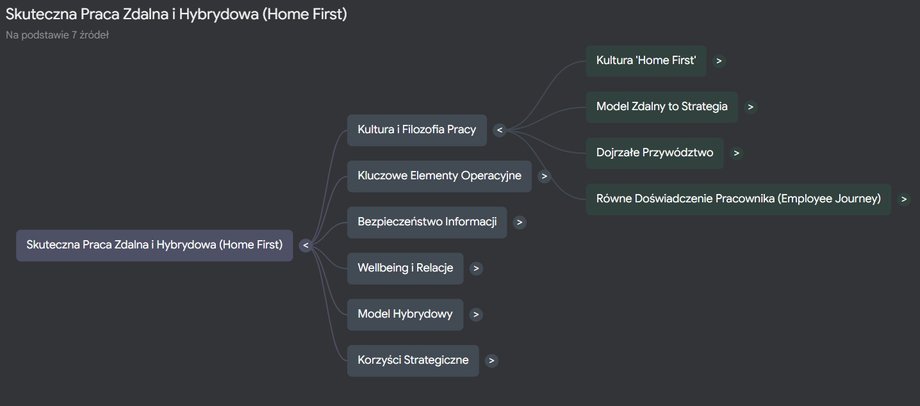
NotebookLM can create a mind map from the sources provided.
|
Matt. own
During the learning day, use the chat like a teacher – ask about comparisons and differences, simplified analogies, translation of mistakes and “test me” in the form of a short quiz. At the end of the session, generate a concise revision guide from the materials, and if you like to learn on the move – turn on the audio review and listen to the whole thing as if it were a podcast.
All of these elements, from reference work and answers with quotes, to study guides, quizzes, flashcards and audio, are built into NotebookLM. So you don't have to switch between different applications.
Read also: I'm 70 years old and I'm experimenting with AI. Those who accept change will survive
A good NotebookLM study plan has several solid steps
First, you choose the sources, because they are the fuel for the entire process. In the tool, you ask questions only in the context of your materials, so the answers are embedded in reliable content and have quotes that will take you to a specific paragraph or fragment of the video transcription with one click.
This is important because you can immediately see whether the answer is not a fantasy (AI likes to hallucinate), and if something is unclear, you can clarify your request or add a better source. You are then asked to build a short path from zero to action, rather than reading everything in order. At the end, you turn your new knowledge into notes, flashcards and a short test. This makes it easier to repeat the material and transfer theory into practice.
The above-mentioned Docker is a great use case for NotebookLM, because this technology contains many concepts that are easy to confuse and small steps that can cause you to stumble. In a regular Google search, we get a thousand answers without a coherent plan. At NotebookLM, we work on our own, narrowed mini data set. Additionally audio discussions help you “listen” to the topic during breaks, and ready-made reports and guides organize your notes after the entire session.
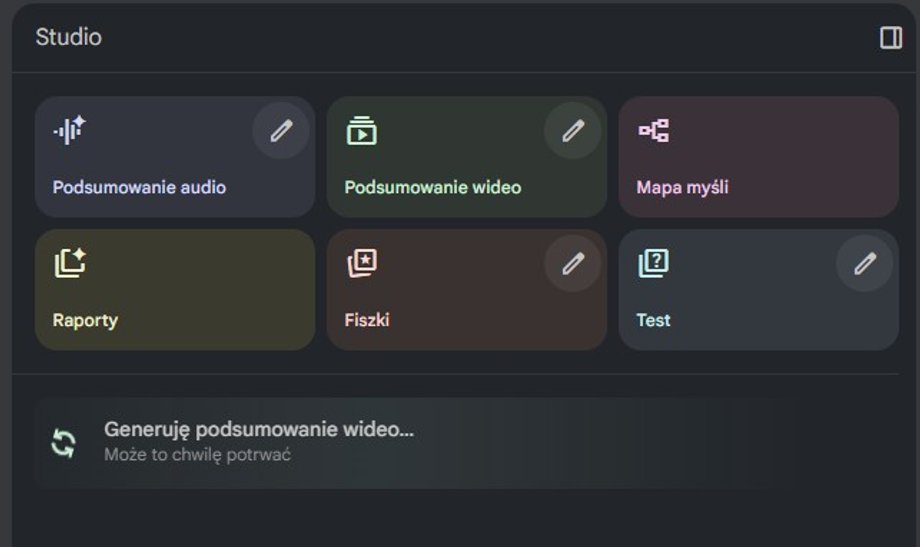
In the section on the right, NotebookLM offers, among others: the ability to create an audio or video summary, or generate a mind map or test.
|
Matt. own
If you're just starting out, plan your studying as if you were arranging two short meetings a day with yourself. In the morning, listen to the audio recording of your materials to catch the main meaning of the topic. In the afternoon, do 45 minutes of practice by completing a specific task or tasks. When something doesn't work, paste the error into NotebookLM and ask for analysis based on added sources from the documentation. At the end of the day, generate a short summary and a “what to check tomorrow” list. After a few days, you will not only have a better understanding of a given topic, but also a ready set of notes for revision.
At the same time, it is worth remembering about hygiene when working with AI. Always have sources you trust at hand and click on quotes to check the credibility of the answers. Remember that AI can create sources and add links, but these will only be “blips” – always check whether specific information actually appears in a given place.
In the end, what remains is the most pleasant. This feeling in control of your own learning. Stories such as the one described by XDA with Docker show that today learning on the Internet is not about finding the perfect online course, but about building a simple, repeatable system, personalized to your own needs. NotebookLM provides such a system right away.
Author: Grzegorz Kubera, journalist of Business Insider Polska