Don't wait until February 1st. This is how you will prepare for KSeF and avoid pitfalls [INSTRUKCJA]


— I run a sole proprietorship and cooperate with three large corporations. I have just heard that from February I will have to issue invoices to them at KSeF. It doesn't matter to them that this obligation will apply to me only from April 1. I will not give up cooperation with them, so I must have access to KSeF – Mr. Krzysztof tells us. And he asks where to start preparing? What should you pay attention to to avoid traps and last-minute nerves?
Based on the experience of Mr. Krzysztof, accountants, banks and companies offering settlement programs, we have prepared a practical guide, a short instruction on how to prepare for the revolution. Here are seven steps worth taking now.
Every sole proprietor's adventure with a new type of invoices – structured invoices – must start by logging in to KSeF. In official language, this means authentication in the Module of Certificates and Authorizations (MCU). Login is available at: National e-Invoice System (ksef.podatki.gov.pl). It is worth noting here that after entering the phrase “KSeF login” into the Google browser, a link to the information portal about KSeF is displayed in the first position, and only in the second position – to the actual KSeF.
As Joanna Łuksza, head of the Accounting Expert Team at IFIRMA.PL, explains, there are three methods of logging in to KSeF. This
Read also in BUSINESS INSIDER
The only free option is to log in via a trusted profile (PZ). A signature or qualified seal is an additional cost – often completely unnecessary in a micro-enterprise.
— An entrepreneur must consider whether he needs to invest in a signature or whether a trusted profile is enough. One thing is certain, to enter KSeF, you need one of these tools – emphasizes Joanna Łuksza.
That's why it's worth taking care of your PZ now. The easiest way is to obtain it online through the portal pz.gov.plusing electronic banking.
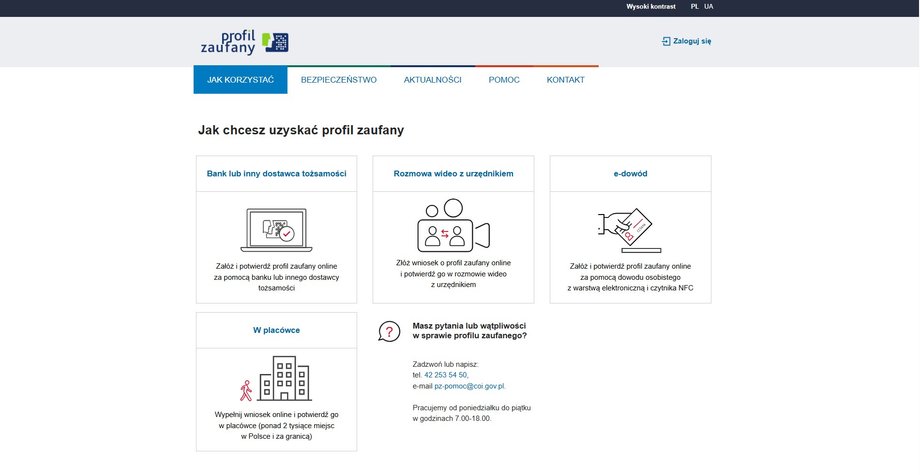
Ways to obtain a trusted profile
|
ePUAP
However, Joanna Łuksza points out that you cannot log in to KSeF via electronic banking. KSeF does not provide an option like ZUS for logging in to eZUS.
Note: the above description applies mainly to sole proprietorships. In the case of companies, foundations and associations, i.e. entities that are not natural persons, the adventure with KSeF begins differently. First, you must submit a ZAW-FA application to the tax office, indicating the persons authorized to act in KSeF. When the tax office grants permissions, which is notified by e-mail, the indicated person can log in to KSeF, e.g. via a trusted profile.
See also: Do you want to invoice the old way in 2026? Take into account the consequences
Step 2. Log in to KSeF and get to know the system
Our entrepreneur, Mr. Krzysztof, does not conclude distance contracts and does not participate in tenders, so he does not need a qualified signature. Importantly, he has a trusted profile and can log in to KSeF immediately. At this stage, it will not issue an e-invoice or collect it. Maybe:
- generate certificates (we write more about them in the next paragraph);
- grant permissions to other people or systems.
It's worth understanding the difference between these two KSeF tools.
— Certificate it is a technical key that allows the invoicing program to connect to the KSeF account – explains Joanna Łuksza. And he adds that powers is suitable for a specific person (e.g. an accountant) or entity (e.g. an accounting firm). The scope of permissions may vary, from broad (to issue and receive invoices) to narrow (only to view them).
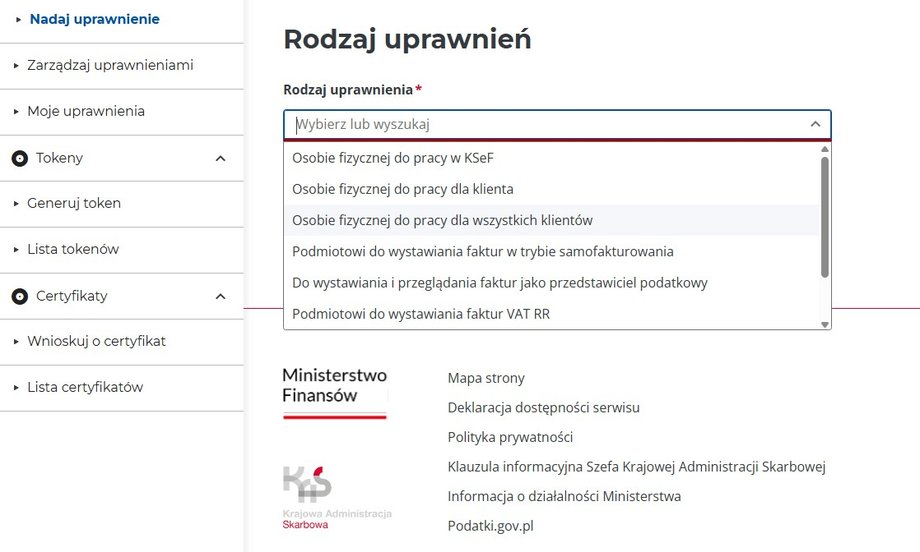
Type of permissions
|
MF
Here it is worth knowing that before February 1 you log in to KSeF Taxpayer Application – pre-production environment. The production version, i.e. KSeF proper, will launch only on February 1. Permissions granted in the pre-production version will not be automatically transferred to the production version.
However, this does not mean that you can wait until zero to log in.
Read also: Have you heard about KSeF but haven't started yet? This is what you need to know
Step 3. If you use an invoicing program, generate a certificate,
If the entrepreneur has previously issued invoices in a commercial program, his supplier will most likely ask him to generate a KSeF certificate.
— The certificate works like a key – it allows the program to send invoices on behalf of the company – explains Joanna Łuksza.
Therefore, it is worth generating the certificate as soon as possible and submitting it to the system operator. Thanks to this, as Piotr Juszczyk, chief tax advisor at inFakt, notes, the implementation of KSeF will be largely invisible to companies using modern accounting systems. — The change will generally be of a technical nature, adds Juszczyk.
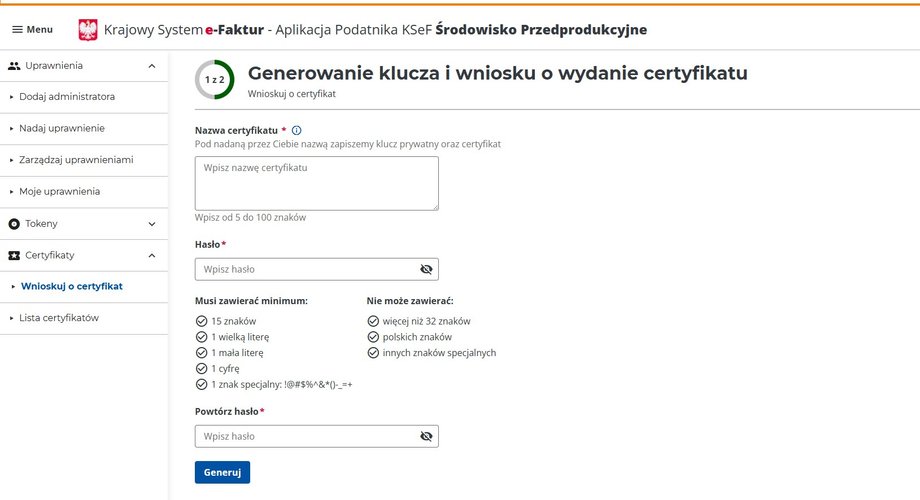
Application for a certificate
|
MF
Such a solution is also required by, among others: banks offering invoicing. This is done, for example, by mBank, which offers companies mOrganizer, which includes functions for issuing invoices.
— mOrganizer is fully integrated with KSeF. To start using KSeF-related functions, the client only needs to upload an authentication certificate and an offline invoice certificate to mOrganizer – explains Piotr Teodorczyk, director of the corporate client department at mBank. Therefore, customers do not authorize the bank to access KSeF, but use their own certificates, which, after being uploaded to the system, are encrypted and protected against access by unauthorized persons. — After uploading the certificate, users can send and receive invoices directly from KSeF via mOrganizer, adds Piotr Teodorczyk.
Many programs will work similarly, in which, for example, there will be a button to send an invoice to KSeF.
It is worth noting here that certificates generated before February 1 in the pre-production version of KSeF will be valid after this date. As a rule, their validity period is two years. The earlier the entrepreneur obtains the certificate, the lower the risk of problems after the launch of KSeF.
Step 4. Do you issue invoices in Excel? Check how to do it in KSeF
However, Mr. Krzysztof does not use accounting software. What does he need to prepare for?
— This group of entrepreneurs, as well as those who issue invoices manually on paper, will be most affected by the introduction of KSeF in their everyday work. In practice, this means the need to change the way of working or implement additional software – says Piotr Juszczyk.
He explains that the spreadsheet does not allow for issuing an invoice to KSeF. Data from Excel must be transformed into an XML structure and sent to the system using an appropriate tool or application. It is worth noting here that the XML structure is actually a sequence of strange characters, incomprehensible to the average person, which define the structure of the document, which allows them to be sent between different systems.
What can Mr. Krzysztof do? You can choose from commercial programs integrated with KSeF or free tools offered by the Ministry of Finance:
- KSeF Taxpayer Application,
- KSeF Mobile Application,
- e-Micro company.
Mr. Krzysztof must decide which solution to choose in February. Other entrepreneurs have more time. From February 1, the KSeF applies only to those whose turnover in 2024 exceeded PLN 200 million including VAT. From April 1, it will cover other companies, but not all. The smallest companies that issue invoices monthly for less than PLN 10,000 PLN, they have until the end of the year. They will only have to fully benefit from the KSeF from January 1, 2027. Until then, they will only collect invoices from large companies.
Two things are important when issuing invoices. First of all, an invoice issued in KSeF cannot be changed, deleted or canceled.
– The only way to change it is through a corrective invoice – admits Joanna Łuksza.
Therefore, before you start issuing documents “seriously”, it is worth getting to know the selected tools thoroughly. An error in the contractor's name or amount will result in the need to issue a correction invoice.
Secondly, you cannot issue an invoice retrospectively. Many entrepreneurs used to issue monthly invoices for the previous month, e.g. in March or February, and with a February date to settle it in that month.
– This will not be possible in KSeF – emphasizes Joanna Łuksza.
Step 5. Determine with the accountant what the cooperation will look like
The most important thing will also be to establish a model of cooperation with an accountant or accounting office. Mr. Krzysztof currently collects the month's invoices, scans the paper ones, and sends everything by e-mail to the accountant. KSeF changes this completely. Therefore, it is worth asking your accountant now what model of cooperation he or she proposes. In short, there are four models to choose from:
- Full service by an accountant: entrepreneur gives the accountant the authority to issue and collect invoices. An accountant, a specific natural person, manages all documentation in KSeF.
- Full service provided by an accounting office: entrepreneur gives rights to the owner of the accounting office, i.e. the company.
- Hybrid support: The entrepreneur himself issues sales invoices in KSeF (using his own program or the Ministry of Finance application), while the accountant has the right to view (download) purchase and sales invoices in order to post them.
- Forwarding documents: The entrepreneur independently operates KSeF and sends documents to the accountant, e.g. e-invoice visualization. This visualization has a QR code that allows you to find it in KSeF.
Each of these models has advantages and disadvantages, which is a topic for a separate article. However, one issue is crucial. You need to know who will receive access to KSeF. It is a system for issuing and receiving invoices, and the entrepreneur bears full responsibility for the documents. – It's a matter of trust – a person with access sees financial data, but depending on the scope of rights, he or she can act on behalf of the company – emphasizes Joanna Łuksza.
Step 6. Schedule the collection of cost invoices
KSeF does not only issue invoices, but also collects them. More and more suppliers will only send documents through the system. The invoice can simply appear in KSeF – without e-mail and without PDF. Therefore, you need to determine:
- who checks KSeF,
- how often
- whether it is done by a program, an accountant or an entrepreneur.
The lack of an invoice in the settlements means the risk of tax errors and problems during inspections. KSeF therefore forces new habits – either regular logging in or automation.
Step 7. Don't leave KSeF until the last minute
The most common mistake of micro-entrepreneurs is waiting until zero hour. Anyone who runs a business has probably heard that the National e-Invoice System will be launched on February 1.
However, few people know that they will have to use this system from February, because from that month, invoices must be issued by companies with a turnover exceeding PLN 200 million, e.g. owners of gas stations, telecommunications operators, leasing companies.
Orlen has already announced that it will only issue invoices structured in KSeF. Do you want to collect your fuel invoice? You must have access to the system. Do you have a leased car? The invoice will also be sent to KSeF. Do you work with a large corporation? More and more companies announce that from February they will not accept paper or PDF invoices.
– Therefore, there is no point in waiting until February 1, you just need to look for information about KSeF, check how to get into the system and how it will work – says Joanna Łuksza.